For retail stores & small businesses
100% free, for life — no subscription, no card, no catch

Bill in 3 seconds. Talk to it to get work done. Operate in 20 languages and 170+ currencies.

Billy is retail billing and inventory management, built for the counter. Serve many customers at once, scan, print, or just say it. 0 subscription. 0 card. 0 catch.

Connected suppliers Voice billing Barcode & F-keys 80 mm receipts
POS terminal

A bill in 3 seconds.

Scan or say the items, take the payment, print. Billy adds the tax and works out the change, and every customer keeps their own open bill, so the queue never stops.

  1. 1sScan, tap or saythe items land on the bill with tax
  2. 2sTake paymentcash, UPI or card, change worked out
  3. 3sPrint58 mm, 80 mm or A4, drawer opens
  • Find any item fast: start typing a name, brand or barcode, or scan it straight onto the bill.
  • One open bill per customer: switch between them while each one shops.
  • Cash, UPI or card: Billy works out the change.
  • Discounts and quantities right on the bill, all from the keyboard or by touch.
  • Voice billing in Billy Desktop: say the item and the quantity.

Help is built in

Type what you want to do and the POS shows you the steps and the keys. New staff bill on day one.

Voice billing

No keyboard. Just say it.

In Billy Desktop, say “Billy” and talk to the counter. Add items, change quantities, give a discount and take the payment, hands free, while you pack the bag.

  • Say the items: “two toned milk and one bread” goes straight onto the bill.
  • Change anything: quantity, a discount in percent or rupees, remove the last item or clear the bill.
  • Take payment: “pay by cash, received five hundred”, or UPI, or card.
  • Add the customer: say their phone number.
  • Billy talks back with what it did, and “what can I say” lists the commands.
Billy is listening
YouBilly, two toned milk and one bread
BillyAdded toned milk × 2 and bread × 1
YouTen percent discount on bread
BillyBread · discount 10%
YouPay by UPI
BillyPaying by UPI · sale complete

Example. Voice billing is in Billy Desktop, with the voice download.

Billy on your phone

The counter fits in your pocket.

The Billy Android app bills from any phone in the store: tap or scan the items, take the payment and print the receipt, with the same items and customers as Billy on your computer.

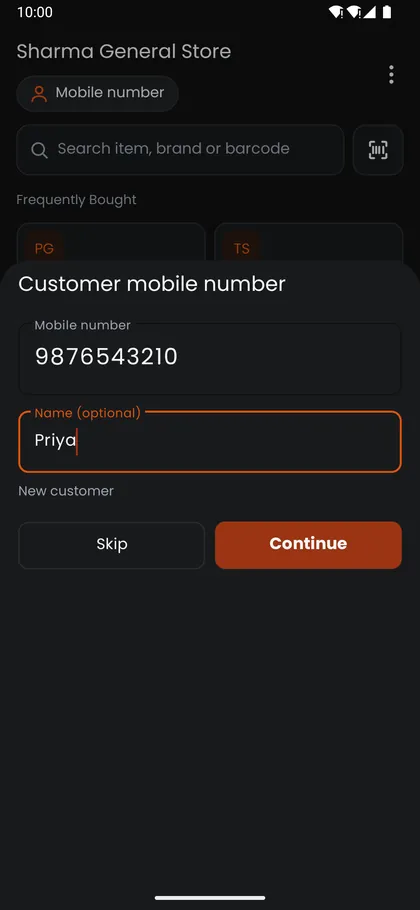
Billy Android app asking for the customer's mobile number, with an optional name and a Skip button
Customer by mobile number
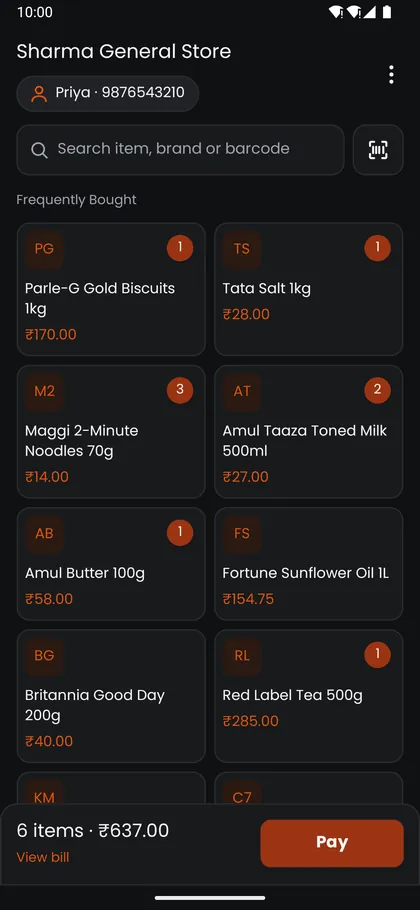
Billy Android app with a search and barcode scan bar, Frequently Bought item tiles with prices and counts, and a bar showing 6 items and the Pay button
Tap, search or scan
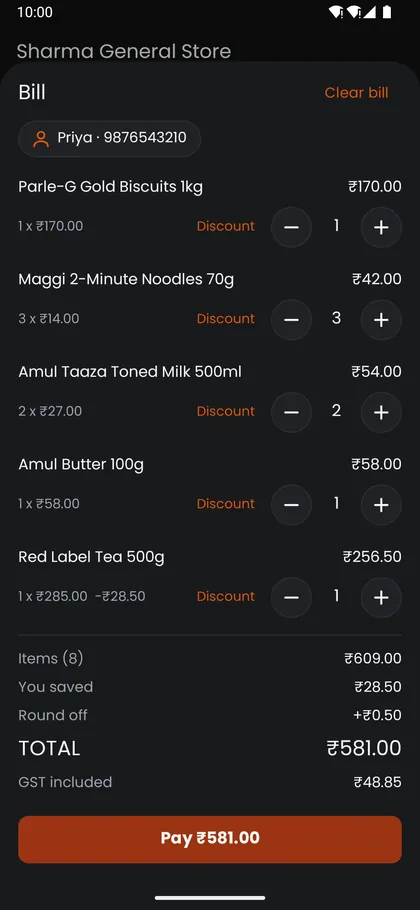
The bill on the phone: five items with quantity buttons, a 10 percent discount on tea, the amount saved, round off, the total with GST included and a Pay button
The bill, with GST
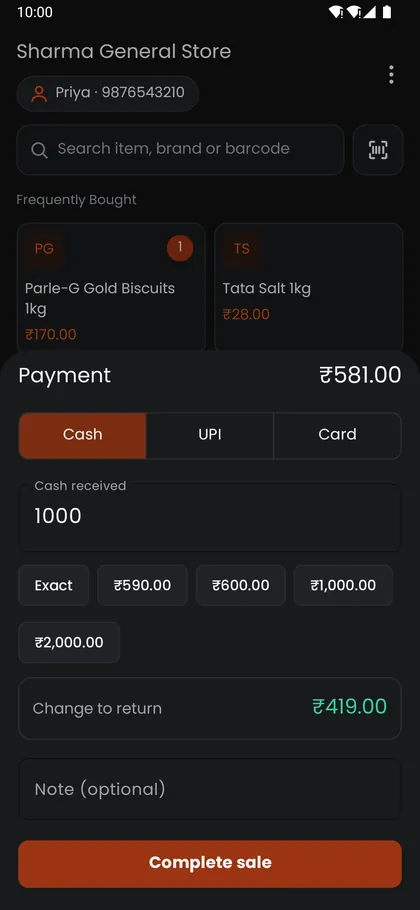
Payment on the phone: Cash, UPI or Card, quick cash amounts, cash received and the change to return
Cash, UPI or card
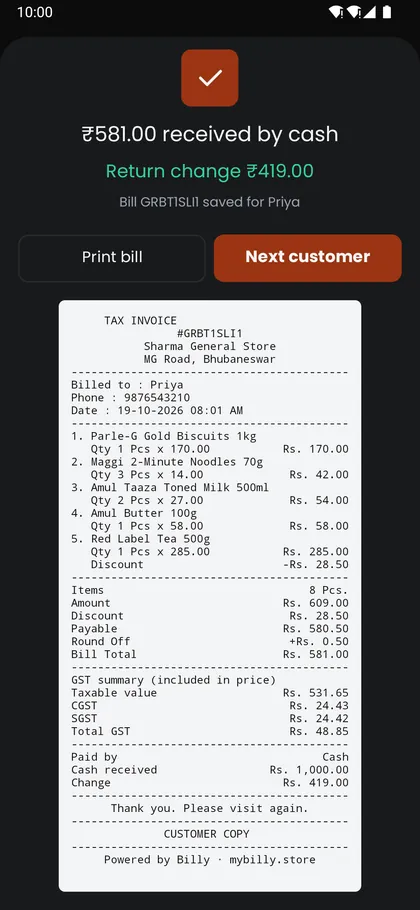
Sale complete on the phone: amount received by cash, change to return, Print bill and Next customer buttons, and the receipt preview with the GST summary
Sale done, receipt ready
  • Tap, search or scan: your Billy items are on the phone, Frequently Bought up front, and the camera reads barcodes.
  • Customer by mobile number: a new number becomes a new customer as you bill, or skip it for Misc Sales.
  • Discounts, GST and change: discount any line, take cash, UPI or card, and Billy works out the change.
  • Bluetooth receipts, even offline: print on a 58 mm or 80 mm printer. Bills are saved on the phone and back up to Billy when the internet is on.
Download the Android appAPK for Android phones, about 9 MB. Sign in with your Billy licence key.
Your store online

Your store, open online from day one.

Every Billy store gets its own page on Drow. Customers browse your items with photos and prices, and order from their phone.

  • A store link and QR code to print at the counter or send to customers.
  • Share on WhatsApp in one tap.
  • Brahma AI fills in item descriptions and pictures, so your store looks good to customers.
  • "Store updated · items live" shows in Billy the moment your changes are online.
Orders

They order by link or QR. No order slips through.

Anyone with your order link can browse and order without signing up. For a regular customer, make a private store with their own link and QR code.

  • Private order links for the customers you choose.
  • Orders grouped by customer, with open orders first, so no customer's order is missed.
  • Invoices by customer, with unpaid ones first.
The Scan to order panel of a Diwali offer banner: a QR code that opens the store's page on Drow, and the offer dates
Every order shows where it is
  1. New
  2. Accepted
  3. Packed
  4. Shipped
  5. Delivered
Printing options

Print the bill the way your store works.

A short slip on the receipt roll, or the full tax invoice on A4. Pick the paper once and every bill prints that way.

  • 58 mm or 80 mm receipts on thermal printers, with 42 or 48 characters a line on 80 mm.
  • A4 tax invoices on any office printer.
  • Paper cut and cash drawer after each bill, if you want them.
  • Test print, then save as default for the whole business.
  • Straight to the printer with Billy Desktop, no print window. In the browser, the print window picks the printer.
Hardware support

Plug in the counter you already have.

Billy works with everyday store hardware. Most of it needs no setup at all.

Receipt printers

USB, Bluetooth and network thermal printers, found by Billy Desktop. Network printers by IP address.

Office printers

Any Windows printer for A4 invoices.

Barcode scanners

USB and Bluetooth scanners in keyboard mode work out of the box, in the browser too. Serial and Bluetooth serial scanners with Billy Desktop.

Cash drawer

Opens after each bill through the receipt printer.

Headset or microphone

For voice billing in Billy Desktop.

Phones and tablets

The POS works by touch on any screen, in the browser.

Billing · Inventory · Orders

Everything behind the sale.

Billing

  • Invoices with GST, HSN codes and a GST summary
  • Receipts on 58 mm, 80 mm or A4
  • Invoices grouped by customer, unpaid first
  • Sales against last week on the dashboard
Inventory management

  • Products, groups and categories
  • Stock items across godowns and warehouses
  • Import items with photos and prices from your supplier
  • Brahma AI fills in pictures, descriptions and tax details
  • Low stock on the dashboard

Order workflow

  1. New
  2. Accepted
  3. Packed
  4. Shipped or ready for pickup
  5. Delivered
  6. Invoiced
  • Store orders from Drow land in Billy
  • Orders grouped by customer, open first
  • Invoice an order when you bill it
Bring them back

Bring them back every festival.

Pick an occasion and your items. Billy makes the banner, with festive artwork, offer prices against MRP and a Scan to order QR that opens your store.

Every occasion

Diwali, Christmas, Eid, Holi and more, suggested for your country.

Prices that sell

Offer price, struck-through MRP and the discount, worked out for you.

Square, portrait or wide

For WhatsApp, Instagram, your website or Facebook.

Share in one tap

Send the banner and your order link on WhatsApp.

The Campaign Builder: occasion, menu, items, design, then generate and share.

Campaigns

Banners your customers scan to order.

Pick an occasion and your items, Billy makes the banner with prices and a Scan to order QR, and you share it on WhatsApp.

Real banners from Billy, made for a sample store, Pramila Store.

Speaks your language.

Billy works in 20 languages and bills in your local currency.

Languages: English, German, Spanish, French, Italian, Dutch, Polish, Portuguese (Brazil), Portuguese (Portugal), Swedish, Russian, Arabic, Hebrew, Urdu, Indonesian, Vietnamese, Thai, Japanese, Korean and Simplified Chinese.

  • ₹ INR
  • $ USD
  • € EUR
  • £ GBP
  • AED
  • SGD
  • MYR
  • AUD
Behind the counter

The rest of the store, in step.

Tally connect

Keep your accounts in step with Tally. Paste Billy's connect key into TallyPlug and your bills reach Tally.

Keeps billing offline

Billy Desktop keeps the counter going without the internet.

Works with TallyPrime

Your Billy store and TallyPrime, in step.

TallyPlug connects your TallyPrime to Billy. Type it once, never again: data flows both ways, automatically.

  1. 1In Billy, open Connect › Tally and copy your connect key.
  2. 2Install TallyPlug on the computer that runs TallyPrime.
  3. 3Paste the key and keep Tally open. TallyPlug finds your company and connects it.
Two-way sync No re-typing Made for TallyPrime TallyPlug is free
Visit the TallyPlug site (opens in a new tab)
Billy Desktop

Billy on your counter PC

Install Billy on the store's Windows computer for voice billing, serial scanners and billing that carries on offline.

Billy Desktop for Windows

Billy Desktop works with your Billy account. Create your store first, then download it from inside Billy: with voice billing, or the smaller version without.

Create your store first
System requirements for Billy Desktop
  • Windows 10 or 11 (64-bit)
  • 4 GB RAM (Billy itself uses about 1.3 GB)
  • Dual-core processor
  • About 1 GB of free disk space, an SSD is recommended
  • Optional: a headset for voice billing, and a bill printer
Plugins

Add more power when you need it.

Switch plugins on from Billy's Settings. Use only what your store needs.

Brahma

AI
Pay per use with credits

AI for your products, your business and your prospects.

  • Fills in descriptions, pictures, uses and raw materials of your items, one or many at a time.
  • Builds your business profile and any party's profile, one part at a time, with KYC checks.
  • Researches prospective buyers and suppliers.
  • Paints festival campaign backgrounds and writes banner text.
Visit the Brahma site (opens in a new tab)

Raavan

Channels
Monthly plan

Sell on online channels and receive their orders in Billy.
  • Publish your products to your channels.
  • Channel orders arrive as sales orders, with the rest of your orders.
  • Keeps prices and stock in step on every channel.
  • Sends sales invoices and receipts to Zoho Books.
Connects with Shopify WooCommerce Amazon Zoho Books
Visit the Raavan site (opens in a new tab)

Your customers are a link away.

Open your store today and send your first festival offer.

Top